
Redact legal documents in your browser — then brief ChatGPT safely
Detect PII locally, apply consistent pseudonyms, export Markdown for AI. Your files never leave your device.
Live demo · runs in your browser
Sample engagement letter
Original
0 hits markedReady for ChatGPT
Markdown pathCONFIDENTIAL — Engagement letter excerpt From: jane.doe@northbridge-law.com Phone: (415) 555-0198 Client SSN: 234-56-7890 Northbridge Holdings LLC and Jordan Hale entered into this Agreement on January 15, 2024. Case No. CV-2024-00123 concerns the property at 1200 Market Street, San Francisco, CA 94102. Settlement amount: USD 1,250,000.00 Please brief ChatGPT only after redaction.
Lawyers already paste contracts into ChatGPT. The risk is the paste.
SafeToAI sits in front of that habit: redact first, then analyze. It is not another AI lawyer — it is the privacy step your AI workflow is missing.
Common path
Matter → paste / upload → ChatGPT
Client names, IDs, and deal terms leave your machine before you have reviewed what the model will see.
SafeToAI path
Matter → redact in browser → Markdown → ChatGPT
Parsing and detection stay local. You export only the redacted text you choose to share.
Local by design
Browser-side parsing and detection. We do not receive file contents to “improve the model.”
Pseudonyms that stick
The same party keeps the same token across a matter so relationships survive.
Built for the AI handoff
Export Markdown ready for ChatGPT, Claude, or internal tools.
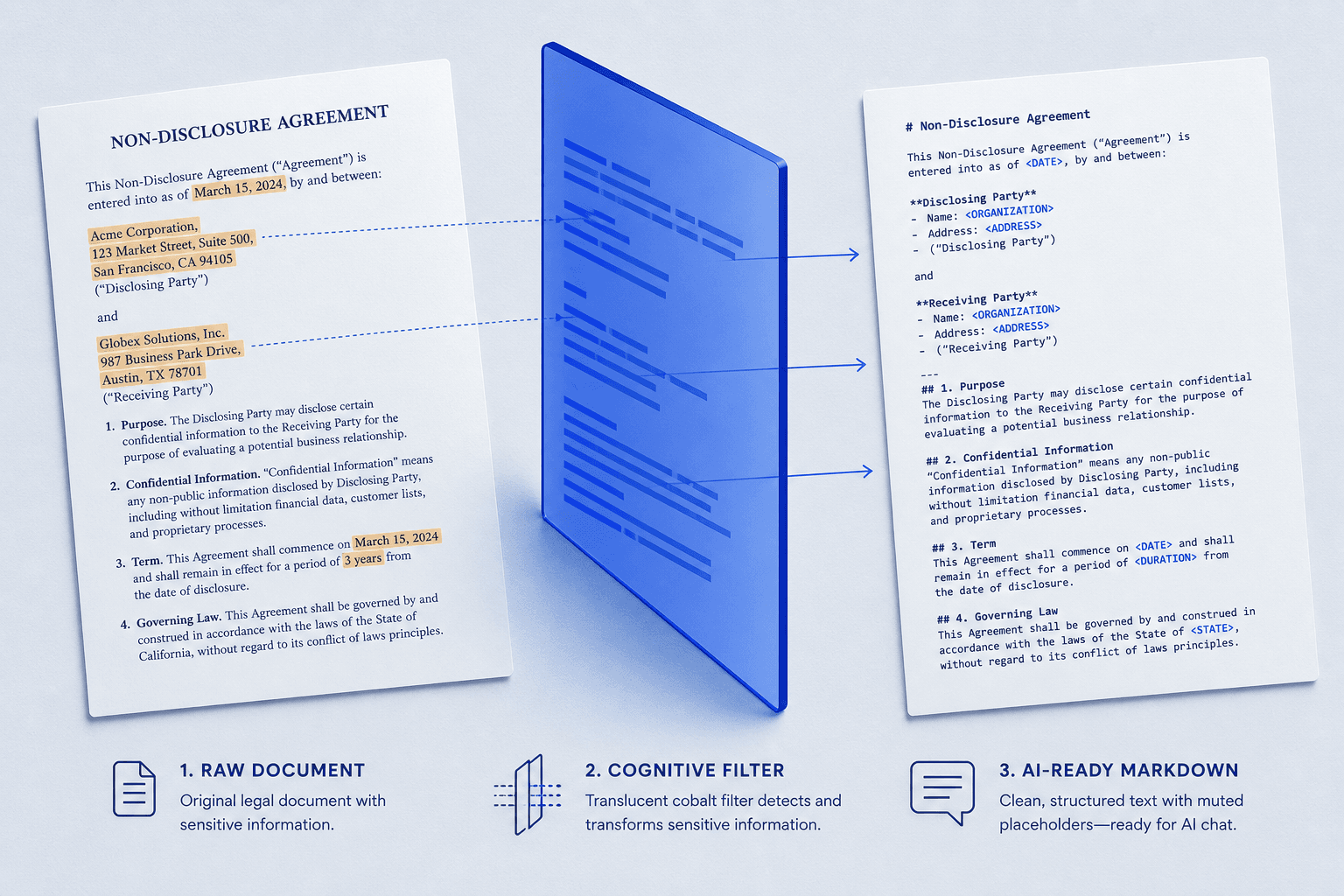
From matter file to AI brief in four steps
Same core workflow as dedicated offline redaction tools — delivered as a shareable web workspace for English-speaking legal teams.
- 01
Open a matter file locally
Drop DOCX, text-based PDF, TXT, or Markdown. Parsing runs in your browser with Mammoth / PDF.js — the file is not sent to SafeToAI.
- 02
Review every detection
Toggle, remove, or add spans. You stay responsible for the final redaction before anything leaves your machine.
- 03
Export Markdown for AI
Download clean Markdown with stable tokens like [PERSON_01] so ChatGPT or Claude can reason about the deal without seeing real identities.
- 04
Optional local restore
Keep a mapping.json on disk. When the model returns analysis, restore originals locally — still without uploading the matter.
Why not upload-and-redact SaaS?
| Concern | Typical cloud redactors | SafeToAI default |
|---|---|---|
| Where text is processed | Vendor servers / AI APIs | Your browser |
| Matter retention risk | Upload logs & vendor retention policies | No file upload on default path |
| AI readability | Black bars or crude masks | Consistent pseudonyms |
| Handoff to ChatGPT | Copy from PDF UI | Markdown export |
| Restore after AI draft | Often unavailable | Local mapping.json |
Entity coverage (v1)
English-general patterns tuned for contracts, correspondence, and pleadings. Always human-review before sharing. Scanned PDFs / OCR ship later.
- Emails
- Phones
- SSN / ITIN-like IDs
- Credit cards
- Organizations
- Person names (heuristic)
- Addresses (coarse)
- Dates
- Currency amounts
- Case-like IDs
Popular workflows
One page per intent — open a guide, then run the same local workspace.
Start with one file. Stay local.
No account required. Try the demo above, or open the full workspace for mapping export and restore.
Assistive software only. You remain responsible for reviewing redactions before disclosure.